


OneDrive

Feb 19, 2026
 128
128
OneDrive is a cloud storage platform that backs up files on your computer to any device that has OneDrive installed. The way we have it configured is to back up 3 locations:
- Desktop
- Documents
- Pictures
Should you need anything outside of those 3 (e.g. Downloads) You can put anything from those locations into the 3 listed above and it will back up just the same.
In order to ensure you have your OneDrive up and running and synced you can follow these steps:
In the lower right side of your monitor you should see the following 
- Click the blue icon as pictured above and it will bring up the One Drive menu
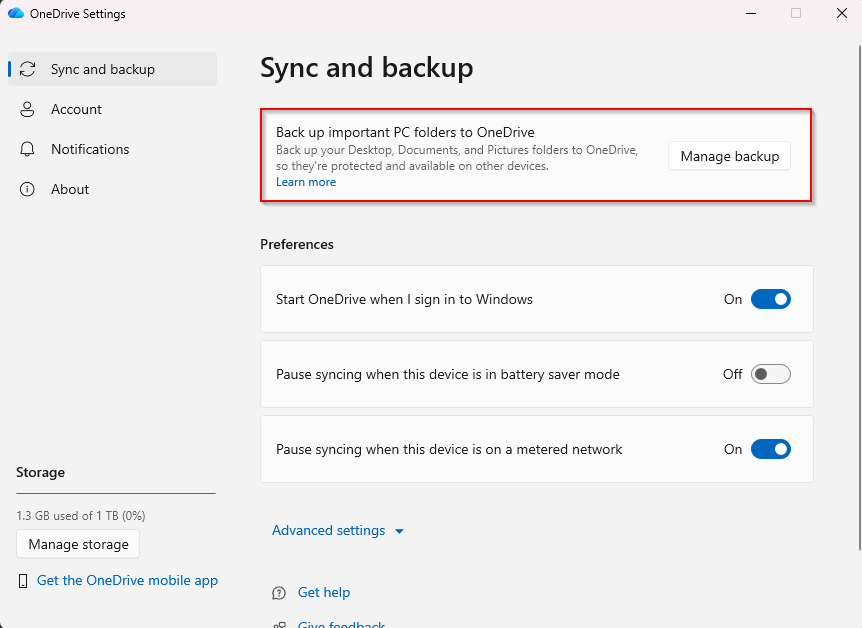
- In this main menu here you will see these options from here, please click manage back up.
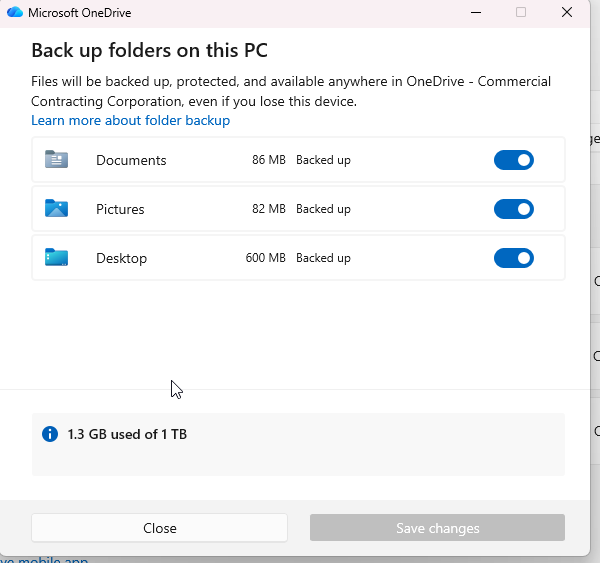
- From here it will show you that your folders are either backed up or need to be backed up. This should be turned on by default but if it is not, all you need to do is turn those 3 locations on and hit the back up button on the bottom right.
Should you have any questions please feel free to reach out to us!

